

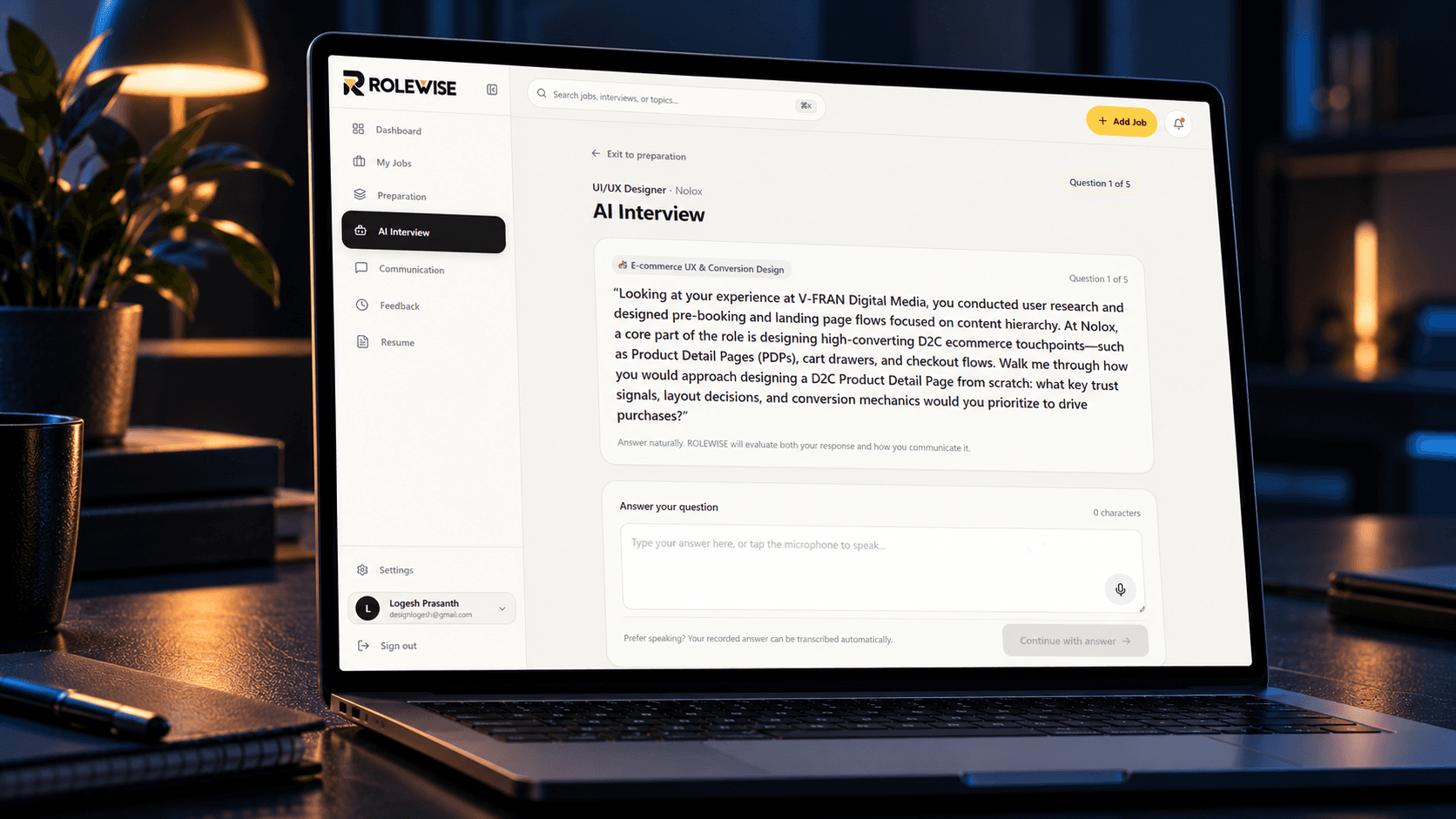
Rolewise is a responsive AI-powered career preparation platform designed to help job seekers move from job discovery to interview readiness in one connected experience. It combines job tracking, role analysis, resume evaluation, personalized preparation, communication practice, and AI-powered interviews into a focused workflow.
My Approach
Rolewise was designed around a simple problem: job seekers often use multiple disconnected tools to prepare for a single opportunity. They search for jobs in one place, analyze their resume somewhere else, prepare interview questions separately, and practice communication using another tool.
My approach was to bring these activities into one connected product experience. The product uses a candidate's resume and target role to identify relevant preparation areas, surface potential experience gaps, and guide them toward focused practice.
The design process focused on simplifying complex career-preparation workflows while maintaining a clean, approachable interface that users can navigate without extensive onboarding.
Vision and Product Thinking
The vision behind Rolewise is to become a personalized preparation workspace for every job opportunity.
Instead of treating interview preparation as a generic checklist, Rolewise connects preparation directly to the target role. The product helps users understand:
How well their experience matches a role
Which requirements they already demonstrate
Where their experience needs further investigation
What topics they should prepare
How they can practice before the interview
How effectively they communicate their answers
This creates a more contextual and personalized preparation experience.
Identifying Unique Challenges
Job preparation involves several disconnected and complex tasks. Users need to understand job requirements, evaluate their own experience, adapt their resume, identify skill gaps, prepare relevant topics, and practice communicating their answers.
The challenge was to connect these different workflows without making the product feel overwhelming.
Rolewise addresses this by organizing the experience into clear stages:
Discover → Analyze → Prepare → Practice → Improve
The interface uses progressive disclosure, clear status indicators, structured cards, and focused calls to action to help users understand what to do next.
Resolving Complex Problems
One of the core challenges was translating a job description into actionable preparation.
Rolewise's Role Fit experience analyzes requirements and categorizes them into areas such as:
Strong Alignment
Transferable
Needs Investigation
Not Demonstrated
Rather than simply presenting an overall score, the product provides contextual evidence behind each requirement, helping users understand why a particular area needs attention.
The preparation experience then converts these findings into specific preparation areas, allowing users to practice topics directly related to the role.
Resume & Candidate Experience
The Resume experience acts as the foundation for Rolewise's personalization.
Users can maintain their professional background and skills while Rolewise uses this information to connect their experience with specific job requirements.
The interface presents key skills and resume processing status in a simple, easy-to-understand format. This creates a foundation for generating more relevant role analysis and interview preparation.
AI-Powered Interview Practice
The AI Interview experience takes preparation one step further by allowing users to practice realistic role-specific questions.
Instead of generic interview questions, Rolewise generates questions based on the target role and identified preparation areas.
The experience is designed to evaluate both:
What the user communicates and how they communicate it.
Users can type their responses or use the microphone to practice answering naturally.
User-Centric Design
The product experience is built around reducing cognitive load during a stressful part of the job search.
The interface uses:
Clear information hierarchy
Minimal navigation
Consistent card-based layouts
Strong visual states
Contextual actions
Progressive disclosure
Responsive layouts
Accessible contrast and readable typography
The goal was not to add more features, but to make the existing complexity easier to understand and act upon.
Meeting User Needs
Rolewise supports the user's journey throughout the interview preparation process:
Find a role
Add a job or provide a job description.
Understand the fit
See how existing experience aligns with the role requirements.
Identify gaps
Understand areas where experience or evidence is missing.
Prepare strategically
Receive focused preparation areas based on the role.
Practice communication
Use voice or video practice to improve communication.
Practice interviews
Complete AI-powered role-specific interview sessions.
Improve continuously
Review feedback and focus on areas that need improvement.
Detailed Pages and Features
Dashboard: A central workspace showing active jobs, interviews, practice sessions, feedback, recommendations, and upcoming activities.
My Jobs: A dedicated space for managing and tracking target job opportunities.
Role Fit: Analyzes the candidate's experience against individual role requirements and highlights strengths and gaps.
Preparation: Converts role analysis into focused preparation areas and actionable practice topics.
AI Interview: Provides role-specific interview questions and allows candidates to practice written or spoken responses.
Communication: Provides voice and video practice to help candidates improve clarity and communication.
Feedback: Helps users review their performance and identify areas for improvement.
Resume: Stores the candidate's professional background and skills and connects resume information with role analysis.
Settings: Provides account and product preferences.
Accessibility & Responsive Design
Rolewise was designed as a responsive product experience across desktop, tablet, and mobile breakpoints.
The interface focuses on:
Clear visual hierarchy
Readable typography
Consistent interaction patterns
Keyboard-friendly navigation
Accessible contrast
Clear active and inactive states
Responsive content layouts
Touch-friendly interaction areas
The goal is to maintain the same core experience regardless of the device being used.
Conclusion
Rolewise is designed to make interview preparation more contextual, structured, and actionable.
Rather than giving candidates another generic interview-preparation tool, the product connects the entire journey around the specific role they want to get.
From understanding role requirements and evaluating experience to preparing, practicing, and improving, Rolewise brings the process into one focused workflow.
Rolewise — Prepare for the role. Not just the interview.


